npm run upgrade you notice it upgrades everything - literally all the packages. Cool! That is what you wanted, right? But wait again. In next quick step, (because now "quick" is always trendy) you rebuilding your project and during the compilation something isn't working properly. You also know the project is lacking of proper tests (integration/e2e). You remember very well there was always pressure of pushing new business feature further, and the tests was always like dead weight stopping you to complete you tickets in agile board before end of the sprint. Furthermore, at this place in time you cannot be sure if whole project works correct without literally manually test all places in your app which may take long, really long of your time. Next, you discover some dependencies changed, and few options pop up in your head:
npm. If you work with node environment, you may encounter some opinions that npm can be really messy package manager, and there are some better alternatives. Some of this may be true, some may not - it's not me judging it here. So, if you're a huge fan of some other package managers, don't get so easily discouraged. I also have some my personal preferences, although here I'm just trying to show you the general solution how to solve the problem. I think the widespread popularity of npm is important here, and can be easily applied to alternative package managers. I could also bring the analogy with using different cars - it's not about the car's itself (I mean the brand you drive), it's about to moving from point A to point B.ncu, in order to help us accomplish this task bit more easily. For now let's see the graph of process:graph TD
A[Start: Patch Dependency Upgrade] --> B{Run Patch Tests};
B -- Pass --> C[Commit & Deploy Patch];
B -- Fail --> D[Fix & Re-test Patch];
D --> B;
C --> E{Minor Dependency Upgrade?};
E -- Yes --> F{Run Minor Tests Load & E2E};
E -- No --> G{Major Dependency Upgrade?};
F -- Pass --> H[Commit & Deploy Minor];
F -- Fail --> I[Fix & Re-test Minor];
I --> F;
H --> G;
G -- Yes --> J{Run Major Tests Load & E2E};
G -- No --> K[End];
J -- Pass --> L[Commit & Deploy Major];
J -- Fail --> M[Fix & Re-test Major];
M --> J;
L --> K;
K[End];package.json file.# global
npm install -g npm-check-updates
# per project dev-dependency
npm install --save-dev npm-check-updatespackage.json so it would be easier for you and your team to follow next upgrades.{
"scripts": {
"upgrade:patch": "ncu --interactive --target patch",
"upgrade:minor": "ncu --interactive --target minor",
"upgrade:major": "ncu --interactive --target semver", // there is no major in API
"upgrade:all-in-groups": "ncu --interactive --format group",
},
}upgrade:all-in-groups and execute it multiple times based and apply to given stage. As you can see in the picture below, it very nicely divide the upgrading for each of the stage. Plus, it shows the "Major version zero" (e.g.: v0.26.1), where anything may change. So pick the way you like.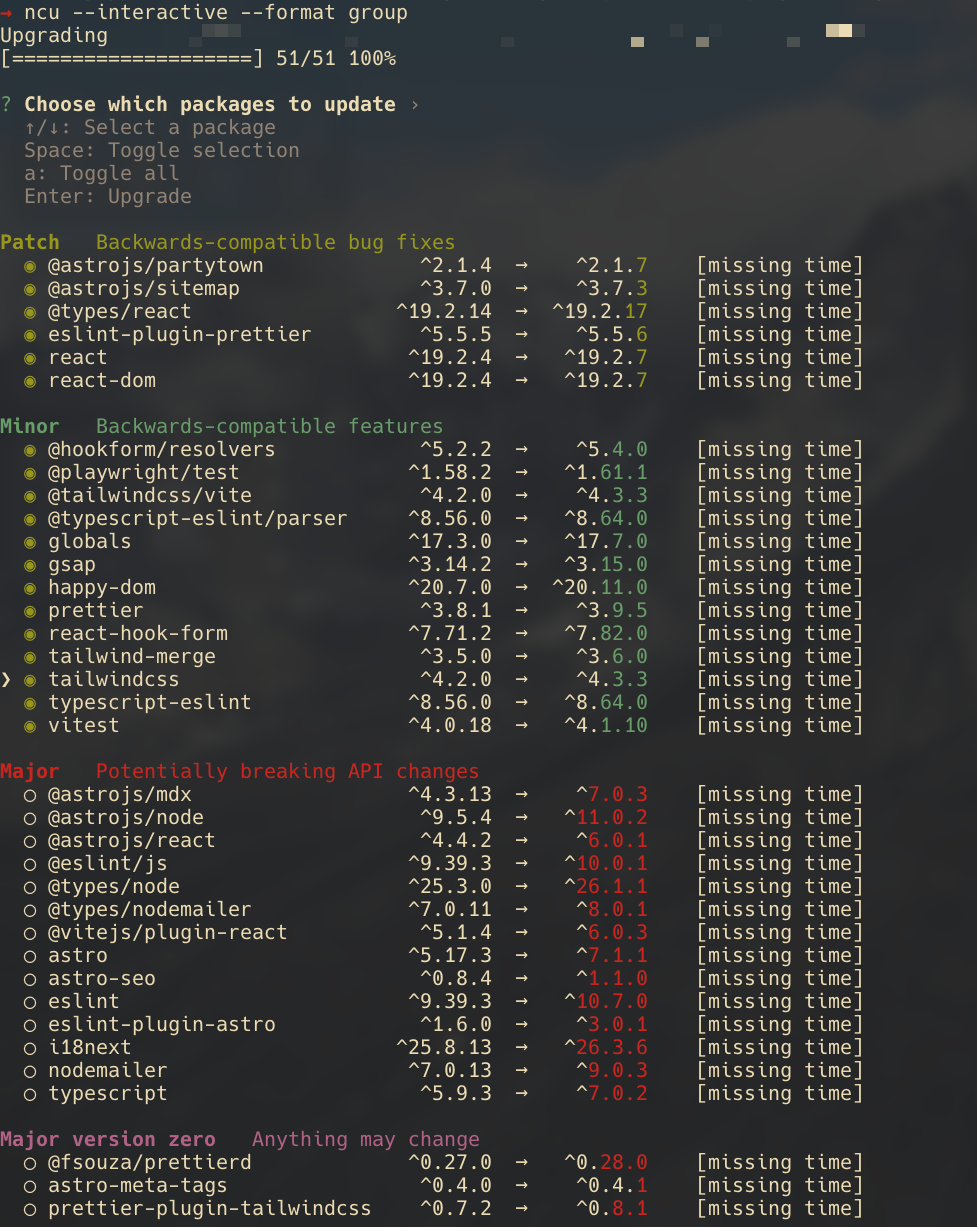
patch, then moving to minor and finally end with major with possible breaking changes. After each minor and major upgrades, I would strongly encourage you to run full pipeline check (i.e: lint, test-unit, build, test-e2e) and if possible, also physically test if everything with application is ok. The level of physical testing (i.e.: how much and deep you should test) I will leave up to you, as each project is different and each stage may require various level of attention to testing (minor updates may require bit less testing, then major).→ npm run upgrade:patch
> johndoe.com@0.0.1 upgrade:patch
> ncu --interactive --target patch --format group
Upgrading /Users/johndoe/workspace/gitlab.com/johndoe/portfolio/portfolio-astro/package.json
[====================] 51/51 100%
? Choose which packages to update ›
↑/↓: Select a package
Space: Toggle selection
a: Toggle all
Enter: Upgrade
◯ @astrojs/node ^9.5.1 → ^9.5.4
◉ @eslint/js ^9.39.2 → ^9.39.3
◯ @testing-library/react ^16.3.1 → ^16.3.2
◯ @types/node ^25.0.6 → ^25.0.10
◯ @types/nodemailer ^7.0.5 → ^7.0.11
◯ @types/react ^19.2.8 → ^19.2.14
◉ @typescript-eslint/parser ^8.53.0 → ^8.53.1
◯ @vitejs/plugin-react ^5.1.2 → ^5.1.4
◯ astro ^5.16.9 → ^5.16.16
◉ eslint ^9.39.2 → ^9.39.3
◉ eslint-plugin-prettier ^5.5.4 → ^5.5.5
◯ happy-dom ^20.1.0 → ^20.1.1
◯ nodemailer ^7.0.12 → ^7.0.13
◯ react ^19.2.3 → ^19.2.4
◯ react-dom ^19.2.3 → ^19.2.4
◯ react-hook-form ^7.71.0 → ^7.71.2
◯ tailwind-merge ^3.4.0 → ^3.4.1
◉ typescript-eslint ^8.53.0 → ^8.53.1
◯ vitest ^4.0.17 → ^4.0.18eslint, @eslint/js, @typescript-eslint/parser, eslint-plugin-prettier, typescript-eslint. Although it's critical to say, grouping by name does not guarantee success. There could be a situation where some grouping by name may have influence on other packages and different selection strategy need to be chosen.→ npm run upgrade:minor
> johndoe.com@0.0.1 upgrade:minor
> ncu --interactive --target minor --format group
Upgrading /Users/johndoe/workspace/gitlab.com/johndoe/portfolio/portfolio-astro/package.json
[====================] 51/51 100%
? Choose which packages to update ›
↑/↓: Select a package
Space: Toggle selection
a: Toggle all
Enter: Upgrade
◯ @astrojs/sitemap ^3.6.1 → ^3.7.0
◯ @fsouza/prettierd ^0.26.2 → ^0.27.0
◯ @playwright/test ^1.57.0 → ^1.58.2
◯ @tailwindcss/vite ^4.1.18 → ^4.2.0
◯ @types/node ^25.0.10 → ^25.3.0
◯ @typescript-eslint/parser ^8.53.1 → ^8.56.0
◯ astro ^5.16.16 → ^5.17.3
◯ eslint-plugin-astro ^1.5.0 → ^1.6.0
◯ eslint-plugin-unused-imports ^4.3.0 → ^4.4.1
◯ globals ^17.0.0 → ^17.3.0
◯ happy-dom ^20.1.1 → ^20.7.0
◯ i18next ^25.7.4 → ^25.8.13
◯ prettier ^3.7.4 → ^3.8.1
◯ tailwind-merge ^3.4.1 → ^3.5.0
◯ tailwindcss ^4.1.18 → ^4.2.0
◯ typescript-eslint ^8.53.1 → ^8.56.0major option to specify the level, let's use our last universal command:ncu --interactive --format groupnpm dedupe to simplify dependencies. https://stackoverflow.com/a/77464178/1977012npm audit to check for vulnerabilities. https://stackoverflow.com/a/65984731/197→ ncu --interactive --format group
Upgrading /Users/maciejsypien/workspace/github.com/kelvin-green/webapp/package.json
[====================] 110/110 100%
? Choose which packages to update ›
↑/↓: Select a package
Space: Toggle selection
a: Toggle all
Enter: Upgrade
◯ @deck.gl/layers ^9.3.1 → ^9.3.2
◯ @deck.gl/mapbox ^9.3.1 → ^9.3.2
◯ @loaders.gl/images ^4.4.1 → ^4.4.2
◯ @typescript-eslint/eslint-plugin ^8.59.0 → ^8.59.4
◯ @typescript-eslint/parser ^8.59.0 → ^8.59.4
◯ @vitest/browser ^4.1.5 → ^4.1.6
◯ @vitest/coverage-v8 ^4.1.5 → ^4.1.6
◯ @vitest/ui 4.1.5 → 4.1.6
◯ babel-plugin-formatjs ^11.3.4 → ^11.3.8
◯ deck.gl ^9.3.1 → ^9.3.2
◉ jsdom ^29.1.0 → ^29.1.1
◯ plotly.js ^3.5.0 → ^3.5.1
◯ postcss ^8.5.12 → ^8.5.15
◯ react ^19.2.5 → ^19.2.6
◯ react-dom ^19.2.5 → ^19.2.6
◯ react-tooltip ^6.0.0 → ^6.0.3
◯ vite 8.0.10 → 8.0.13
◯ vitest ^4.1.5 → ^4.1.6
Minor Backwards-compatible features
◉ @apollo/client ^4.0.0 → ^4.1.9
◯ @types/node ^25.6.0 → ^25.9.0
◯ date-fns ^4.1.0 → ^4.2.1
◯ eslint ^10.2.1 → ^10.4.0
◯ globals ^17.5.0 → ^17.6.0
◉ graphql ^16.13.2 → ^16.14.0
◯ msw ^2.13.6 → ^2.14.6
◯ react-hook-form ^7.74.0 → ^7.76.0
◯ react-router-dom ^7.14.2 → ^7.15.1
Major Potentially breaking API changes
◉ @graphql-codegen/cli 5.0.7 → 7.0.0
◉ @graphql-codegen/client-preset ^4.5.1 → ^6.0.0
◉ @graphql-codegen/schema-ast ^4.1.0 → ^6.0.0
◯ flowbite ^2.5.2 → ^4.0.2
◯ i18next ^23.16.8 → ^26.2.0
◯ i18next-http-backend ^2.6.2 → ^4.0.0
◉ mock-apollo-client ^1.3.1 → ^2.0.0
◯ react-i18next ^14.1.3 → ^17.0.8
❯ ◯ tailwind-merge ^2.5.5 → ^3.6.0
◯ tailwindcss ^3.4.19 → ^4.3.0
◯ typescript ^5.6.3 → ^6.0.3
◯ zod ^3.23.8 → ^4.4.3
Major version zero Anything may change
◯ katex ^0.16.45 → ^0.16.47patch update, it means it should provide some improvements without breaking the library/package/app. The minor may introduced some new changes, but generally it should not breaking existing business functionalities. Finally, the major upgrade may introduce breaking changes the current API or business functionality, which means it's most likely may require a more work to upgrade that package. ↩
How this works in practice?