Many people ask me why I like Vim so much. Usually, I hear that "this is an ancient editor and you should use something more modern". My answer sounds almost always like: "it depends on what I need".The fact I love Vim doesn't change another fact, that I use also other text editors or IDEs during work. The reason behind it is because configuring Vim to do some special, sophisticated tasks can be tedious, difficult and a lot time-consuming.
Vim vs. IDE
For example, configuring Vim to work as a real IDE is hard and here I mean the configuration, not for a single programming language like - Vim as Python IDE. No, this should not be so difficult. I rather think about configuring Vim as IDE for multiple languages - THIS is difficult.Using Vim's powers only for 1 language would be just so much waste of the greatness this text editor brings to the table. As a webdeveloper, I use multiple languages (not only a single one), so for me, it's not sufficient to have a Vim config designed to operate only for a single language. I am using daily: Typescript/JavaScript, HTML/CSS, Golang, C#, Python, SQL. So now I need to pick what I want? Or having a config for each language? Crazy! No!Therefore I use Vim almost exclusively for efficient document edition or creation but in sense of a single operation which takes a max of a couple of minutes. Vim is extremely efficient for opening and editing even multiple GBs of files. Although, Vim was not designed to work in a single window session for multiple hours (like IDEs doing it) - believe me or not, but I've already tried that multiple times with a different set of configurations and workflows. Of course, if someone is stubborn and wants to do it, will do it anyway - but it does not change the fact that it doesn't make much sense for me so far.At this time on the scene enter IDEs. Editors on steroids, designed for great development experience, and when mastered, they increase developer's productivity far more than just regular text editors. I very much like IDEs, especially when working multiple hours doing standard CRUD operations on files, saving to git, sending to server, comparing between branches - Ay Captin', they are great for this. Period. 🙌
An example where Vim is showing off
However, recently I received a task that was perfect to show off how effective Vim could be and how it can save your time during development!
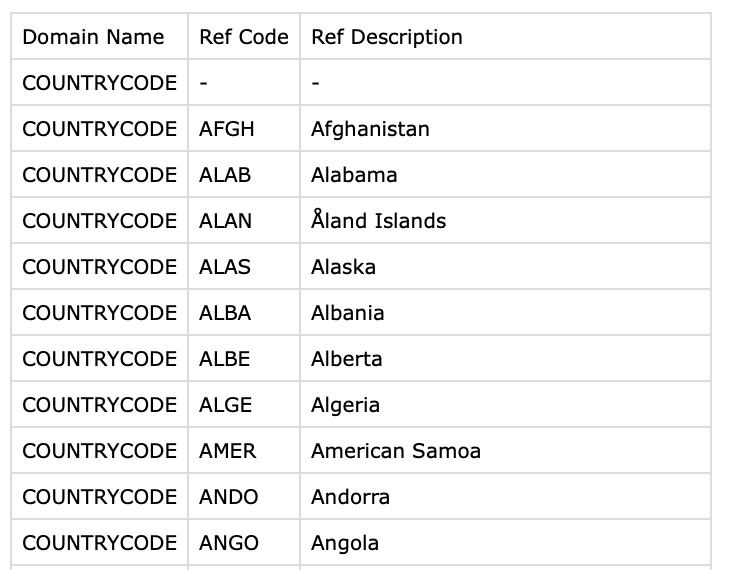
The task was simple while working in pairs on the issue. I had to implement a tedious creation of a C# dictionary from a list of countries I've received from a client in a CSV file (you can download it below), so my colleague could utilize it in his program.
There were 351 rows with ISO Code and the name of that country in English - quite simple.
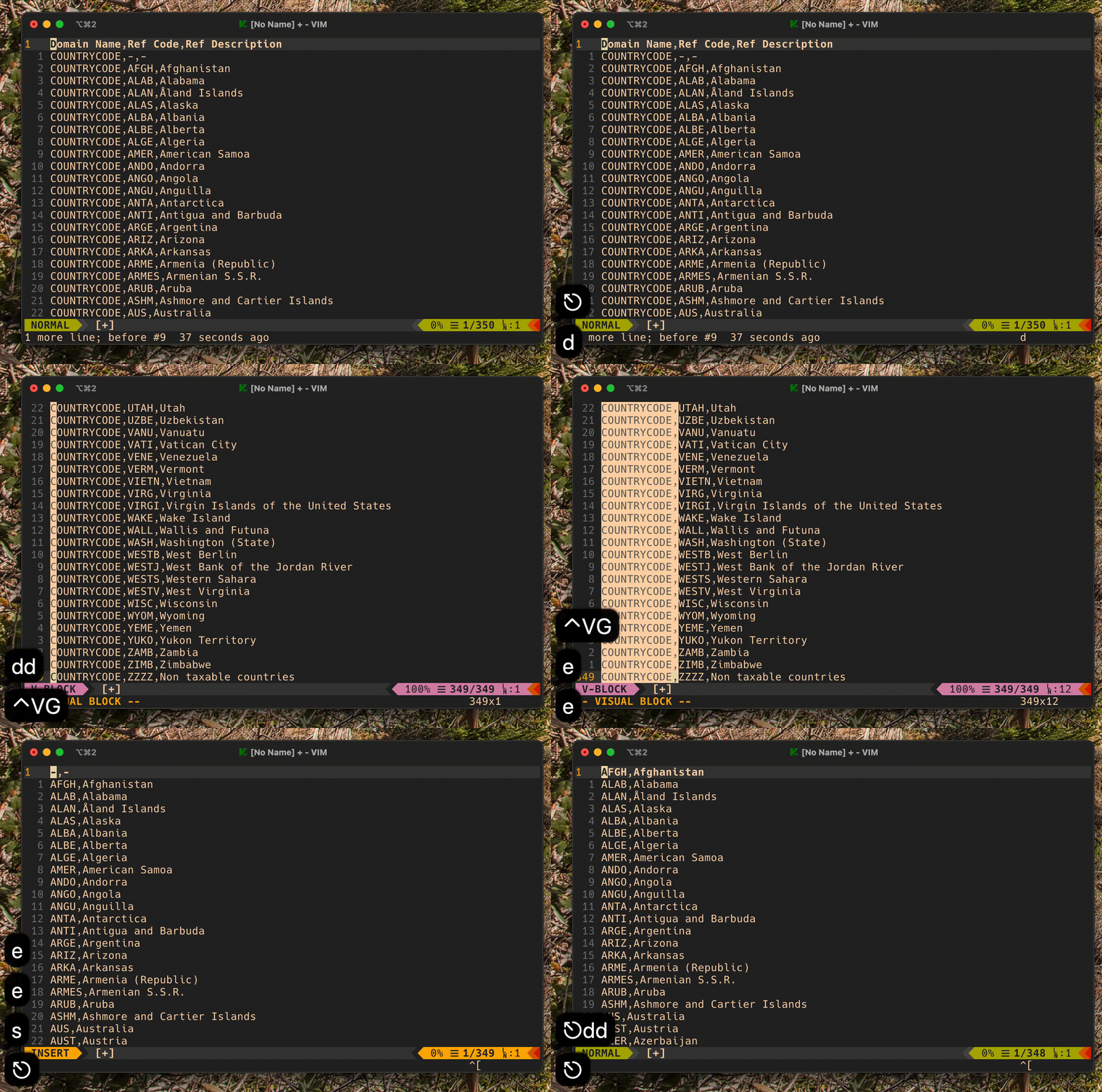
Let's start by getting rid of the first line (the one with column names) and COUNTRYCODE, by column editing.
We have now, a nicely prepared file. We should focus on the next part - building our macro, which will be where the whole magic will happen 🙂.
Although, before jumping into writing, let's think for a second
The plan is to record a clever macro for a single line, and later repeat it for all other lines. But again - how to build this macro?
To build a macro we have to think about and figure out what kind of pattern we could possibly notice by looking at our file? Let's look at a fragment of what we have in current state of file:
a single word (code of country) ARME. Irregular length of characters. Sometimes 3, other time 5.
then comes a coma (,) character
and at the end the full name. It may be long and contains multiple spaces or even other characters.
Well, the simplest way I could think of, would be something like
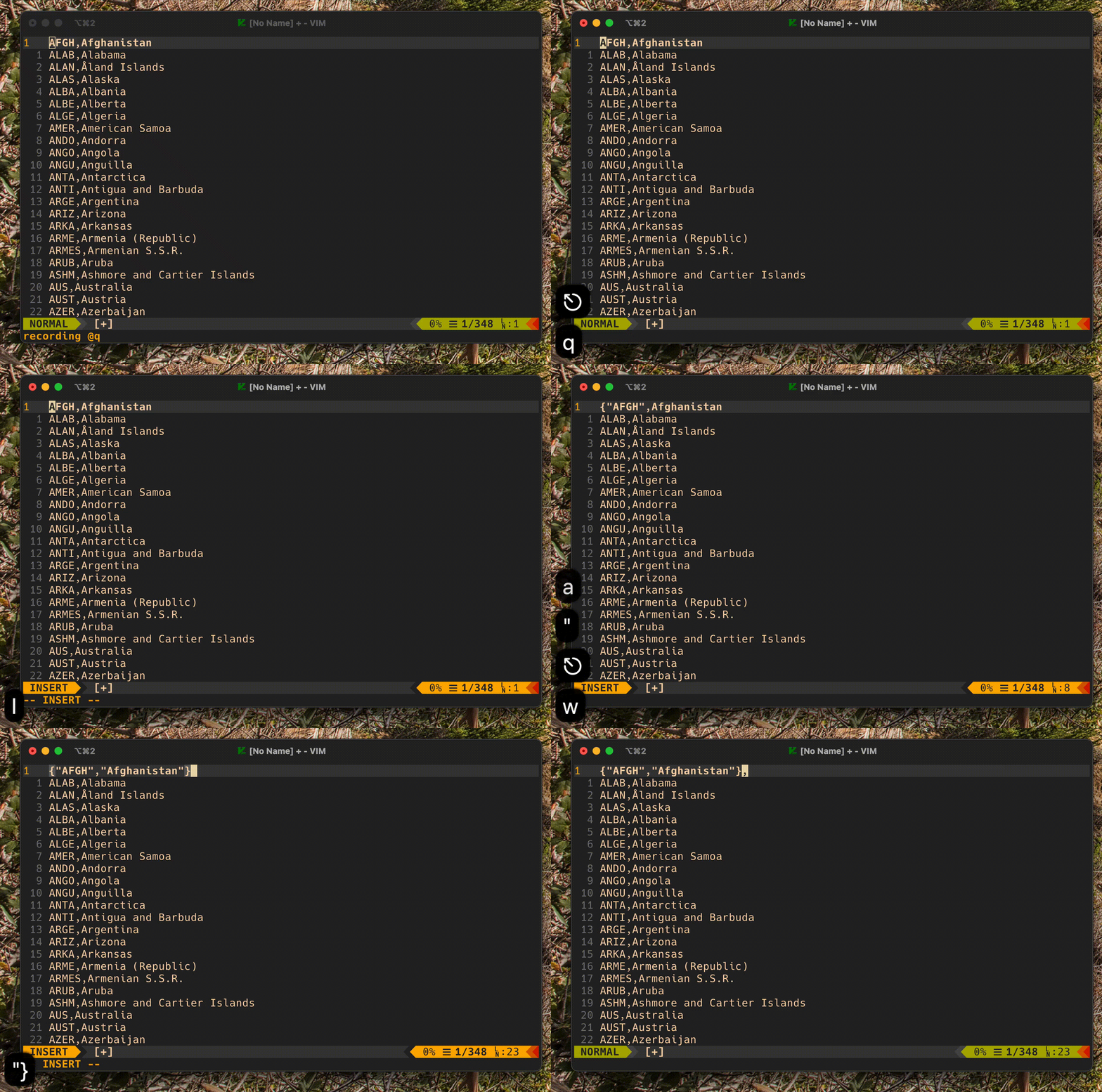
I{"<ESC>ea"<ESC>wi"<ESC>A"},, and the version with a full macro to q register could look like this:
Vim macro
vim
qq<ESC>I{"<ESC>ea"<ESC>wi"<ESC>A"},<ESC>q
Explanation of mysterious macro command
qq = record macro to q register
I = go to insert mode at first character
{" = type {"
<ESC> = go to normal mode
ea" = go to end of word , and start type after current character , type " character
<ESC> = go to normal mode
wi" = go to begin of next word , and start typing in current character , type " character
<ESC> = go to normal mode
A" = go to end of line and start typing, type "}, characters
<ESC> = go to normal mode
q = stop recording the macro
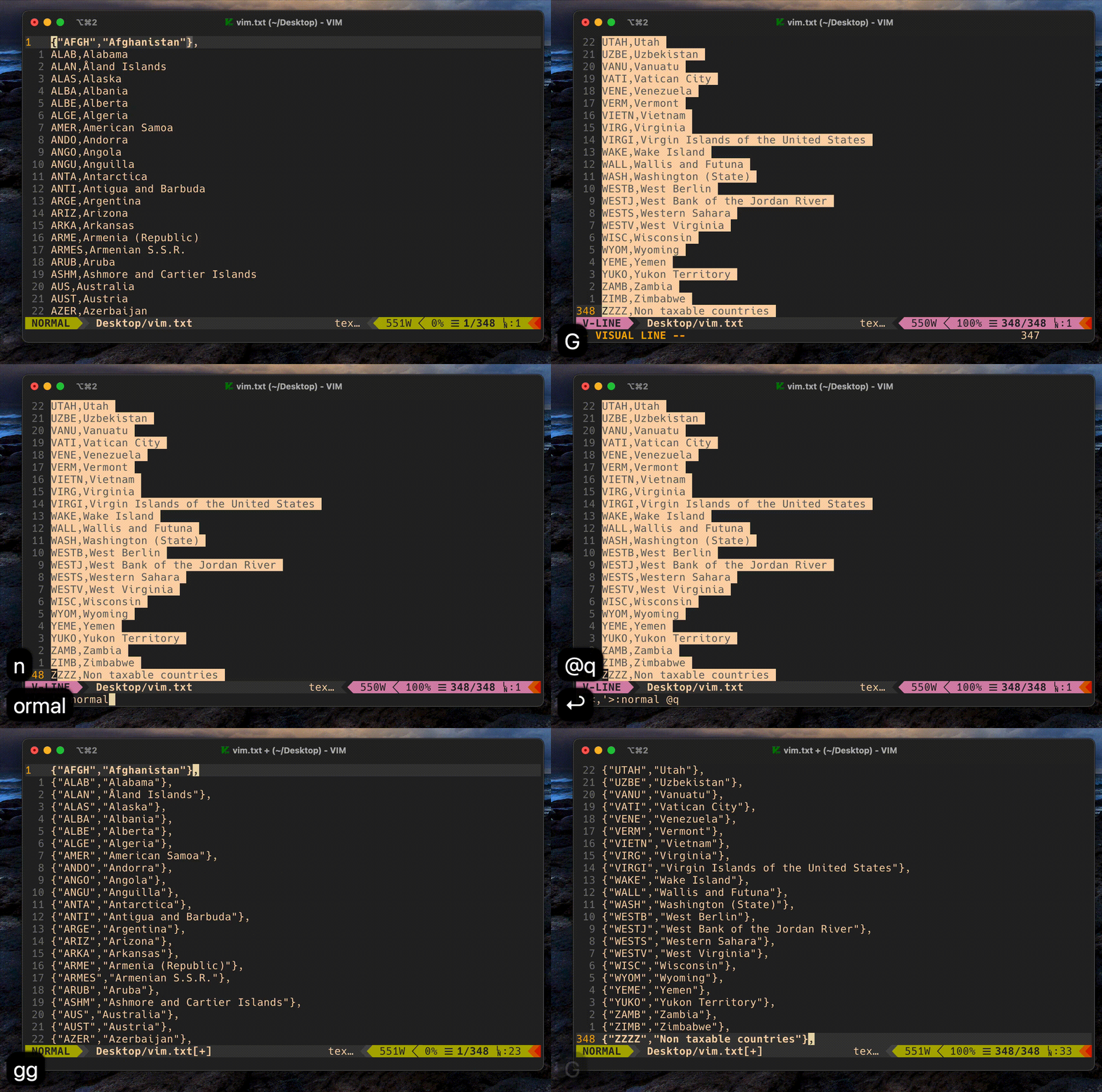
The last step would be to repeat this macro to all other lines (the first line is already done).
Play previously recorded macro
vim
VG::normal @q
How to play recorded macro?
VG = select line and go to last line
::normal = go to normal mode
@q = play recorded macro from the q register
Yes, the core of our class is almost done. The last part would be to wrap it in a class and our work is done! Wow! Honestly, even when I know about Vim macros, this still impresses me.
Note
This task could also be accomplished with any editor which supports a multi-cursor feature (like in SublimeText, or IntelliJ).Although, if this task would be a bit more complex - let's say, we would have additional 3rd and 4th columns - AFAIK only Vim would be able to do it with its "motion operators" (another superpower of Vim).
So, the final result should be like this:
csharp
namespace MYPROGRAM.API.Features.FeatureA { public static class CountryCodes { public static Dictionary<string, string> Countries = new Dictionary<string, string> { {"AFGH","Afghanistan"}, {"ALAB","Alabama"}, {"ALAN","Åland Islands"}, {"ALAS","Alaska"}, {"ALBA","Albania"}, {"ALBE","Alberta"}, {"ALGE","Algeria"}, ... {"YUKO","Yukon Territory"}, {"ZAMB","Zambia"}, {"ZIMB","Zimbabwe"}, {"ZZZZ","Non taxable countries"}, }; }}
Finishing notes
And here we are, at the end of this trivial presentation which could be also summarized as: "What Vim could do for you?".
In the last finishing lines I'd like to say that, as a programmer, while doing some work related tasks, I am usually time-constrained (usually with estimated timebox) to prepare a feature. Therefore, I don't have luxury to spend all of it on searching new tools, which could help me accomplish some repetitive tasks. The decision is most of the time simple: researching a potential solution for a few minutes and if I can't find something that bring me closer to solving the problem, then I proceed it with the existing knowledge & tools. Sometimes, it require from me using some external CLI program, sometimes writing a small script, and literally if nothing else can help, as the last resort is to apply changes manually. With Vim, any changes are really easy and honestly, I don't know until know any other tool which I could so quickly and simple accomplish the results.
The true advantages of Vim don't show up because the editor has been developing for more then 30 years. It's true power lie in very well thought through input system which make any modifications easy.
Today we have 2020, and almost any more advanced editor now have the multi-cursor1. The true power of Vim is hidden in its motion operators like w, e, b, etc. and explicit diverge for typing modes (insert, visual, block, etc.), an of course macros. IMHO, those 3 makes from Vim an ancient artifact with enormous superpowers. Once mastered, the man can make things the others can only dream about 😉.
Hope you had some fun and learn something new. Thank you for your precious time of reading this article and see you in next article.
Footnotes
If you didn't know that before, Vim also came along with some sort of the predecessor of "multi-line" cursor already in 1986 - it was simply called visual block mode, or block edit. ↩
How can we construct this macro? And how this macro will be used?